
The map seed is a pretty darn important piece of information in Diablo II: Resurrected offline games, as it allows you to use a specific map layout. Why is this important? Because some layouts are better for farming a specific location than others. Some are way better. This may reduce your Andariel run times from 60 seconds to maybe 20, which means a 3 times more efficient use of your time.
Apparently people used to use ATMA to obtain this info, but it doesn’t work in D2R, all it says is
Unknown version 0x63
Unable to load character file
Great. Then some dude suggested using a HEX editor on the .map file at a very specific location to obtain it. Well, I tried it on 3 different saves, for the first one the offset was 0x00000010, for the 2nd one, 0x00000008, and finally 0x0000000C. Gee, thanks? I tried to find a pattern, or anything that would help me decipher this otherwise pretty small file, but to no avail.
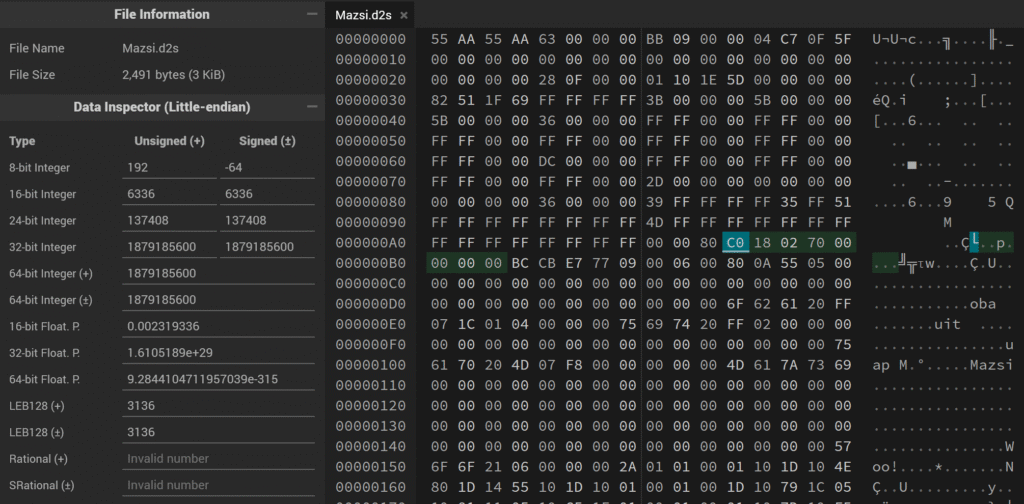
Then I stumbled upon D2-MapID-Finder, which is some Java stuff, but I hate Java anyway. In any case, I realized this uses .d2s files instead of the .map file the D2JSP dude suggested. It uses an offset of 0x000000AB (171) to obtain the seed ID. Hmm, so unlike .map files, .d2s uses a fixed offset for the seed? Great news.
So I went down the rabbit hole of somehow generating the proper, decimal seed value that you can actually use with the game and ended up with this script:
HOME_DIR=$(echo ${USERPROFILE} | tr '\\' '/')
SAVE_DIR="${HOME_DIR}/Saved Games/Diablo II Resurrected"

clear
echo -e "D2R Map Seed Finder\n"

# Go to offset of 171 or 0x000000AB and read 4 bytes, then convert to INT32 Little Endian (DCBA)
function d2r-mapseed()
{
    echo
    SAVE_FILE="${SAVE_DIR}/${D2R_CHAR}.d2s"
    echo -en "Current map seed for \e[44m\e[97m${1}\e[0m: "
    MAP_SEED=$(od --skip-bytes=171 --read-bytes=4 --address-radix=none --format=dI "${SAVE_FILE}" | awk '{print $1}')
    echo -e "\e[42m\e[97m${MAP_SEED}\e[0m"
    echo "${MAP_SEED}" | clip

    read -p "Seed ID saved to clipboard, press Enter to continue..."
    echo
}

function get_saves(){
    # Find all saves and read them into an array
    readarray -d '' ALL_SAVES < <(find "${SAVE_DIR}/" -name "*.d2s" -print0)

    # Construct an array of character names from the save filenames
    ALL_CHARACTERS=()
    for (( i=0; i<${#ALL_SAVES[@]}; i++ ));
    do
        filename=$(basename -- "${ALL_SAVES[$i]}")
        ALL_CHARACTERS+=("${filename%.*}")
    done

    # Present the user with a selection of characters
    PS3='Select character, or 0 to exit: '
    select D2R_CHAR in "${ALL_CHARACTERS[@]}"
    do
        if [[ $REPLY == "0" ]]
        then
            echo 'Bye!' >&2
            exit
        elif [[ -z "${D2R_CHAR}" ]]
        then
            echo 'Invalid choice, try again' >&2
        else
            # Reconstruct the filename from the character name
            d2r-mapseed "${D2R_CHAR}"
            break
        fi
    done
}

while true
do
    get_saves
doneJust save this as d2r-map-seed-finder.sh or something. Also install Git for Windows to have Bash to actually run this. You can create a shortcut for the script and all. Then using it should be pretty self-explanatory:

Then go to Battle.net / D2R / Gear icon / Game Settings, and specify as Additional command line arguments:
-seed <your seed>
And you’re good to go. I’ll try to add some nice seeds below.
| Location | Seed |
|---|---|
| Andariel | 1879185600 |
| Baal | 726005377 |
| Countess | 726005377 |
| Lower Kurast | 1813164125 |
| Mephisto | 1366913940 |
| Nihlathak | 78394677 |
If you know of any other seeds, or better ones for the existing locations, do let me know in the comments.
Cheers!


Hey, I just tried this script and it keeps getting me the same seed number, which doesn’t seem to match the seed of the current map. Did you ever get this to work properly?
I use it regularly, yeah 😀 Do you use mods by any chance? Maybe the script is using your OG saves while you’re in fact using different saves in your mods dir?
It is only giving me 8 digit seeds?
Nay, it varies, seemingly between 8 and 10.